KnockBlock G4+ (KNB)
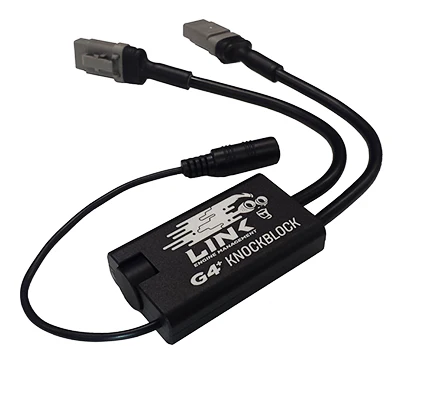
The G4+ KnockBlock is an essential tool for tuning and can aid in the early detection of incorrect ignition timing, lean air/fuel mixtures and mechanical issues. It is used it with ear buds, headphones or noise cancelling ear muffs and features special filtering to allow you to listen in and detect knock early. Listen to one or two knock sensors Special filtering design improves signal to noise ratio Can be used with ear-buds, headphones or noise cancelling ear muffs Long life lithium rechargeable battery Rugged CNC aluminium enclosure Flying lead headphones connector Can be used with all OEM knock sensors Can be used to interface directly to a laptop for recording of engine noise or knock sensor frequency analysis (using PCLink G4+) Please note headphones with their own noise filtering may be unsuitable for use with the knock block. What’s in the Box? G4+ KnockBlock 2 sensor looms (attached) 1 headphone loom (attached) Quick Start Guide 1 USB cable mini 2 Bosch type doughnut OEM knock sensors 2 small Link Engine Management stickers Specifications: Operating Install the knock sensor/s in a suitable location on the engine (typical(more...) Operating _x000D_ Install the knock sensor/s in a suitable location on the engine (typically on a solid mounting point on the block near the cylinder head) _x000D_ If only using one sensor, leave the unused sensor cable disconnected _x000D_ Turn the volume control clockwise until it clicks. The LED indicator will turn blue when the KnockBlock is operating _x000D_ Turn the volume to the minimum setting (most anti-clockwise) _x000D_ Connect headphones to the 3.5mm audio jack _x000D_ Run the engine and carefully increase the volume (clockwise) until engine mechanical noise can be heard. Adjust to a comfortable listening volume _x000D_ _x000D_ Charging _x000D_ Turn off the KnockBlock by turning the volume control anti-clockwise until it clicks _x000D_ Connect the USB charging cable to the KnockBlock’s Mini USB connector. Can be charged from any standard USB charger PC, laptop, car or cell phone charger (2.1A at 5V max) _x000D_ The LED indicator will show red while charging. When the indicator turns off the battery is fully charged _x000D_ Charge the G4+ KnockBlock after use and before storage _x000D_ _x000D_ What’s in the Box? _x000D_ G4+ KnockBlock _x000D_ _x000D_ 2 sensor looms (attached) _x000D_ 1 headphone loom (attached) _x000D_ Quick Start Guide _x000D_ 1 USB cable mini _x000D_ 2 Bosch type doug(more...)
The G4+ KnockBlock is an essential tool for tuning and can aid in the early detection of incorrect ignition timing, lean air/fuel mixtures and mechanical issues. It is used it with ear buds, headphones or noise cancelling ear muffs and features special filtering to allow you to listen in and detect knock early. Listen to one or two knock sensors Special filtering design improves signal to noise ratio Can be used with ear-buds, headphones or noise cancelling ear muffs Long life lithium rechargeable battery Rugged CNC aluminium enclosure Flying lead headphones connector Can be used with all OEM knock sensors Can be used to interface directly to a laptop for recording of engine noise or knock sensor frequency analysis (using PCLink G4+) Please note headphones with their own noise filtering may be unsuitable for use with the knock block. What’s in the Box? G4+ KnockBlock 2 sensor looms (attached) 1 headphone loom (attached) Quick Start Guide 1 USB cable mini 2 Bosch type doughnut OEM knock sensors 2 small Link Engine Management stickers Specifications: Operating Install the knock sensor/s in a suitable location on the engine (typical(more...) Operating _x000D_ Install the knock sensor/s in a suitable location on the engine (typically on a solid mounting point on the block near the cylinder head) _x000D_ If only using one sensor, leave the unused sensor cable disconnected _x000D_ Turn the volume control clockwise until it clicks. The LED indicator will turn blue when the KnockBlock is operating _x000D_ Turn the volume to the minimum setting (most anti-clockwise) _x000D_ Connect headphones to the 3.5mm audio jack _x000D_ Run the engine and carefully increase the volume (clockwise) until engine mechanical noise can be heard. Adjust to a comfortable listening volume _x000D_ _x000D_ Charging _x000D_ Turn off the KnockBlock by turning the volume control anti-clockwise until it clicks _x000D_ Connect the USB charging cable to the KnockBlock’s Mini USB connector. Can be charged from any standard USB charger PC, laptop, car or cell phone charger (2.1A at 5V max) _x000D_ The LED indicator will show red while charging. When the indicator turns off the battery is fully charged _x000D_ Charge the G4+ KnockBlock after use and before storage _x000D_ _x000D_ What’s in the Box? _x000D_ G4+ KnockBlock _x000D_ _x000D_ 2 sensor looms (attached) _x000D_ 1 headphone loom (attached) _x000D_ Quick Start Guide _x000D_ 1 USB cable mini _x000D_ 2 Bosch type doug(more...)
Description
The G4+ KnockBlock is an essential tool for tuning and can aid in the early detection of incorrect ignition timing, lean air/fuel mixtures and mechanical issues. It is used it with ear buds, headphones or noise cancelling ear muffs and features special filtering to allow you to listen in and detect knock early. Listen to one or two knock sensors Special filtering design improves signal to noise ratio Can be used with ear-buds, headphones or noise cancelling ear muffs Long life lithium rechargeable battery Rugged CNC aluminium enclosure Flying lead headphones connector Can be used with all OEM knock sensors Can be used to interface directly to a laptop for recording of engine noise or knock sensor frequency analysis (using PCLink G4+) Please note headphones with their own noise filtering may be unsuitable for use with the knock block. What’s in the Box? G4+ KnockBlock 2 sensor looms (attached) 1 headphone loom (attached) Quick Start Guide 1 USB cable mini 2 Bosch type doughnut OEM knock sensors 2 small Link Engine Management stickers Specifications: Operating Install the knock sensor/s in a suitable location on the engine (typical(more...) Operating _x000D_ Install the knock sensor/s in a suitable location on the engine (typically on a solid mounting point on the block near the cylinder head) _x000D_ If only using one sensor, leave the unused sensor cable disconnected _x000D_ Turn the volume control clockwise until it clicks. The LED indicator will turn blue when the KnockBlock is operating _x000D_ Turn the volume to the minimum setting (most anti-clockwise) _x000D_ Connect headphones to the 3.5mm audio jack _x000D_ Run the engine and carefully increase the volume (clockwise) until engine mechanical noise can be heard. Adjust to a comfortable listening volume _x000D_ _x000D_ Charging _x000D_ Turn off the KnockBlock by turning the volume control anti-clockwise until it clicks _x000D_ Connect the USB charging cable to the KnockBlock’s Mini USB connector. Can be charged from any standard USB charger PC, laptop, car or cell phone charger (2.1A at 5V max) _x000D_ The LED indicator will show red while charging. When the indicator turns off the battery is fully charged _x000D_ Charge the G4+ KnockBlock after use and before storage _x000D_ _x000D_ What’s in the Box? _x000D_ G4+ KnockBlock _x000D_ _x000D_ 2 sensor looms (attached) _x000D_ 1 headphone loom (attached) _x000D_ Quick Start Guide _x000D_ 1 USB cable mini _x000D_ 2 Bosch type doug(more...)